بعد مقارنة هذه الشبكات الافتراضية الخاصة، لدينا رابح!


هناك الكثير من المكونات نتطلع إليها عند مقارنة الشبكات الافتراضية الخاصة، ولكن بشكل عام، ننظر إلى عدد وأنواع المميزات، ومدى سهولة التنزيل والاستخدام، ومدى موثوقية الخدمة ومدى فعالية وكفاءة خدمة العملاء، وإذا كان السعر يناسب الخدمة.
هذا المخطط يمنحك نظرة عامة على هذه المكونات. بعض الشبكات الافتراضية الخاصة متشابهة جدا، في هذه الحالة من الأفضل مواصلة القراءة في كل قسم لمعرفة المزيد.
| مزود VPN |
|
|
|---|---|---|
| تخفيض سرعة التحميل | 10% (UK) | 42% (UK) |
| تخفيض سرعة الرفع | 14% (FRA) | 66% (FRA) |
| زمن البينج على Google.com | 2ms | 335ms |
| متوسط الوقت اللازم للاتصال (ثانية) | 9ms | 18ms |
| ينجح في فك حجب |







|
|
| زيارة الموقع | زيارة الموقع |
تحدد السرعة مدى سرعة تحميل المحتوى، لذا إذا كنت تستخدم التورنت أو تشاهد أحد البرامج مباشرة على الإنترنت فأنت تحتاج أن تكون السرعة مشابهة إلى حد ما لسرعة الإنترنت العادية. بما أن VPN يقوم بتشفير البيانات الخاصة بك، عادة ما يستغرق وقتا أطول قليلا لإرسال البيانات ذهابا وإيابا، مما يمكن أن يبطئ اتصالك. ومع ذلك، إذا كان مزود خدمة الإنترنت الخاص بك يبطئ اتصالك عمدا (المعروف أيضا باسم اختناق) قد يزيد VPN من سرعة الإنترنت الخاص بك. اختبار VPN غير مجدي إلى حد ما لأنه تظهر خوادم جديدة تؤثر على السرعة. يمكن أن تختلف سرعتك أيضا وفقا لموقعك، لذلك قد لا يتطابق اختبار السرعة لديك مع اختبارنا. وبالرغم من ذلك فقد اختبرنا السرعة في العديد من المواقع لنقدم لكم متوسط السرعة.
| مزود VPN |
|
|
|---|---|---|
| موقع الخوادم | 9485 | 9 |
| بلدان الخوادم | 137 | 9 |
| عنوان آي بي | 5,201+ | 9 |
| التغيير الديناميكي للخادم | ||
| زيارة الموقع | زيارة الموقع |
لا يهم فقط عدد من الخوادم، بل يهم أيضًا موقعها. إذا كان لديك 30 خادم في ثلاث مدن، فستظل قادرا على الاتصال بهذه المدن الثلاث فقط. وعلاوة على ذلك، من المهم أن ننظر إلى نسبة عدد الخوادم إلى المستخدمين. المزيد من الخوادم عموما يعني سرعات أعلى، ولكن إذا كان مزود VPN يمتلك عددًا قليلًا من الخوادم أكثر من مزود آخر مع ضعف عدد المستخدمين، فإن المزود الأول عادة ما قدم سرعات أبطأ. للأسف، شركات VPN لا تعرض عدد المستخدمين لديهم، ولكنها جميعا تنافس لكسب المزيد من الخوادم. ألق نظرة على عدد عناوين آي بي والمواقع. المزيد من خوادم آي بي يعني خصوصية أفضل، والمزيد من المواقع يعني الوصول بشكل أفضل إلى المحتوى.
| مزود VPN |
|
|
|---|---|---|
| زمن الاستجابة للبريد الإلكتروني | 3 | X |
| دعم 24/7 |  |
|
| الدردشة الحية | |
|
| قاعدة المعلومات | |
|
| الفيديوهات التوضيحية | |
|
| زيارة الموقع | زيارة الموقع |
في حين يعتقد الغالبية أن الدعم الجيد هو ضروري فقط عند تثبيت VPN، وناك العديد من الحالات الأخرى التي قد تحتاج إلى دعم العملاء. إن الاتصال بخادم معين، وتغيير بروتوكول الأمان، وتهيئة الشبكة الافتراضية الخاصة على جهاز التوجيه الخاص بك، كلها حالات يمكن أن يكون الدعم فيها مفيدًا. نحن نتحقق من جميع مزودي VPN لمعرفة ما إذا كان الدعم متاح في جميع الأوقات (حتى في وقت متأخر من الليل)، ومدى سرعة الاستجابة، وإذا كانوا يقومون بالإجابة على استفساراتنا.
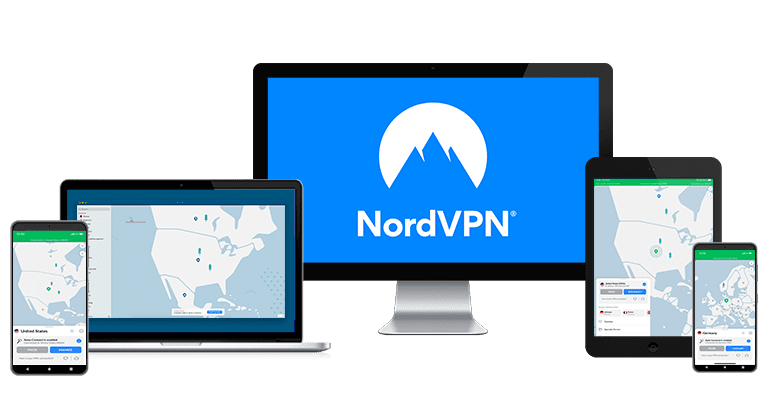
أيًا كان نظام التشغيل الذي تستخدمه، يمكنك حماية ما يصل إلى 10 أجهزة في وقت واحد باستخدام حساب NordVPN. لقد اختبرت التطبيق في وقت واحد على أجهزة آيفون وآيباد وماك بوك وسامسونج إس 22 وكمبيوتر شخصي يعمل بنظام ويندوز. لقد تمكنت من التصفح والمشاهدة من منصات متعددة دون أي مشاكل، بغض النظر عن النشاط الذي كنت أقوم به على كل منها.
بالإضافة إلى ذلك، يمكن إعداد NordVPN مباشرة على أي جهاز راوتر لاسلكي حتى تتمكن من توصيل جميع أجهزتك المنزلية بشكل فعال في وقت واحد دون حدود.
تم تصميم NordVPN لتوفير حل شامل لمختلف الأجهزة وأنظمة التشغيل. التطبيقات متاحة في جميع أنحاء العالم لأنظمة التشغيل ماك وويندوز ولينكس وأندرويد وiOS. الخدمة متاحة أيضًا لعدة أنواع أخرى من الأجهزة، بما في ذلك Fire TV (Amazon Fire Stick)، وKodi، والعديد من أجهزة التلفاز الذكية.
هناك أيضًا دعم رائع لجهاز الراوتر، مع أدلة متنوعة على موقع NordVPN لمساعدتك في إعداد جهاز الراوتر الخاص بك.
تعد NordVPN واحدة من أفضل شبكات VPN على نظام التشغيل ويندوز، مع واجهة تتفق مع هذا النظام. يمكن الوصول إلى جميع الخوادم إما عبر قائمة البلدان أو خريطة أنيقة تمكّنك من تكبير أي منطقة لاختيار الخادم المفضل لديك. الأفضل بالنسبة لي كانت القائمة، ولكن من الجيد أن يكون لديك أكثر من خيار!

لاحظ أن هناك تطبيقًا منفصلاً متاحًا على متجر آبل للتطبيقات لأجهزة ماك المزودة بشرائح Apple Silicon (على الرغم من أنها تعمل بالطريقة نفسها). يمكنك أيضًا تنزيل حزم لتوزيعات لينكس المختلفة مباشرةً من موقع الويب.
تشترك تطبيقات الهاتف المحمول الخاصة بـ NordVPN في نفس المظهر العام وتحتوي على معظم الميزات نفسها الموجودة في تطبيقات سطح المكتب. وهذا أمر جيد، حيث أنك لن تحتاج إلى تعلم أي شيء جديد عند تبديل الأجهزة. ومع ذلك، تفتقر تطبيقات الهاتف المحمول إلى خوادم التعتيم وعنوان IP مخصص، وهو ما قد يكون عيبًا بالنسبة لاحتياجات استخدامك.

يوفر NordVPN تطبيقات مخصصة لفاير ستيك وكروم كاست، مما يتيح المشاهدة الآمنة وغير المقيدة على هذه الأجهزة. للتطبيقات الأصلية واجهة سهلة الاستخدام تشبه نظيراتها على أجهزة سطح المكتب والأجهزة المحمولة، مما يضمن تجربة سلسة عبر جميع أنظمة التشغيل.
التغلب على نقص دعم VPN الأصلي من خلال ميزة Smart DNS الخاصة بـ NordVPN (مثل كيفية توصيل VPN على تلفزيون ذكي ) أو عن طريق تكوين جهاز الراوتر الخاص بك. على الرغم من أن هذه الطرق لا تقدم جميع الميزات الخاصة بشبكة VPN، إلا أنها تضمن وصولك إلى بث تلفزيون آبل دون الكشف عن هويتك مع تخطي الحجب الجغرافي.
برنامج NordVPN واحد من أسهل برامج الـ VPN في التثبيت والإعداد، فهو يعرض لك تعليمات واضحة في كل خطوة، ما يدل على أن الفريق اجتهد في تسهيل عملية الإعداد بقدر الإمكان لكل المستخدمين، سواء أكانوا من المهتمين بالتكنولوجيا أم من المبتدئين.


موقع WizCase يقوم على دعم القرّاء، لذا فقد نتلقّى عمولة عندما تشتري من خلال الروابط المنشورة على موقعنا. لكن هذا لا يعني أنك ستدفع أيّ مبالغ إضافية مقابل أيّ شيء تشتريه عبر موقعنا، لأن العمولة تدفعها الشركة المالكة للمنتج. علمًا بأن بعض المنتجات مملوكة لشركتنا الأم. .